Open source · MIT · v0.6.4

Intrusion detection for your home network, explained in plain language.

SentinelAI watches your network's traffic, spots port scans, floods and network sweeps, and tells you what each alert means and what to do about it. It runs on your own hardware.

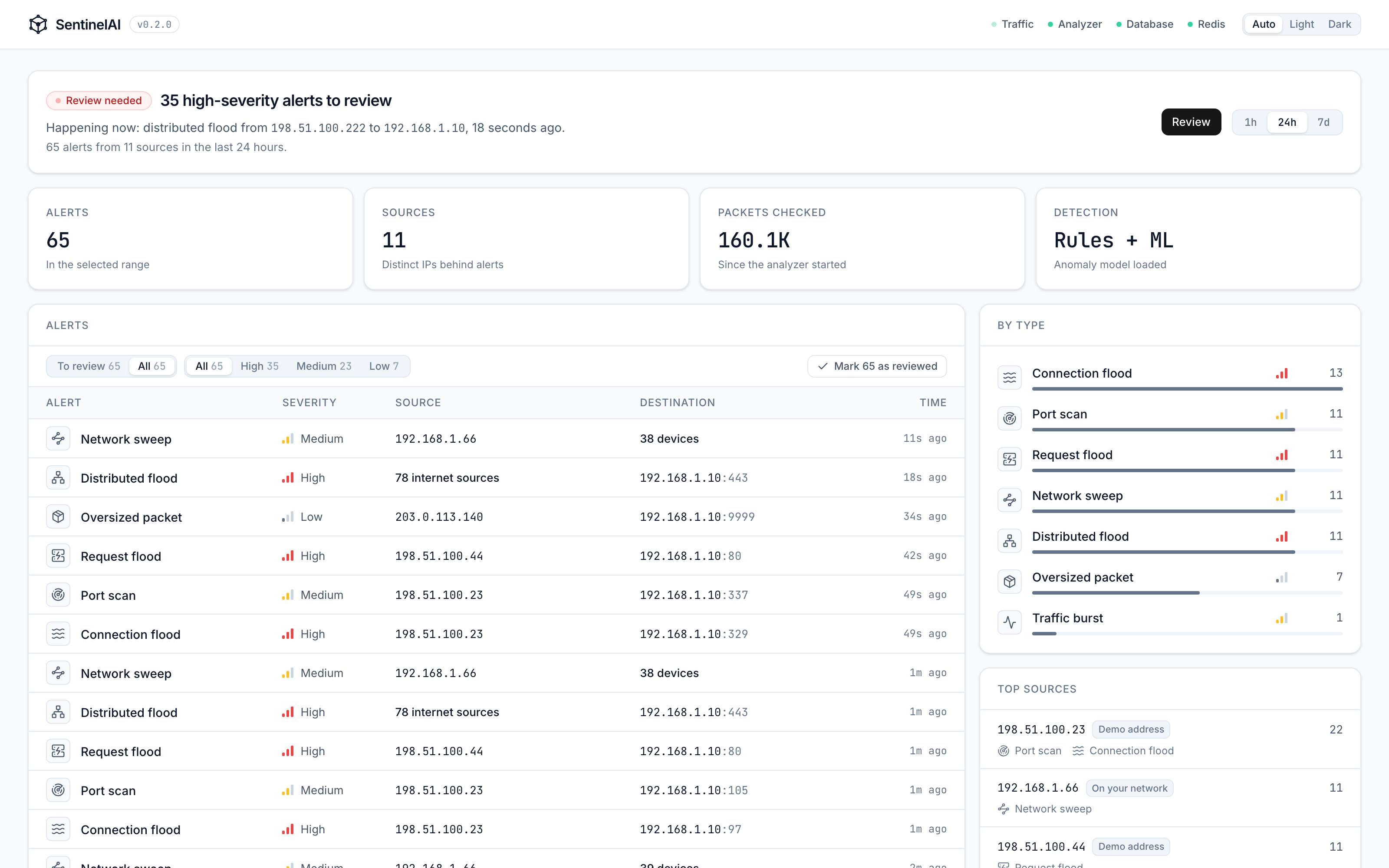
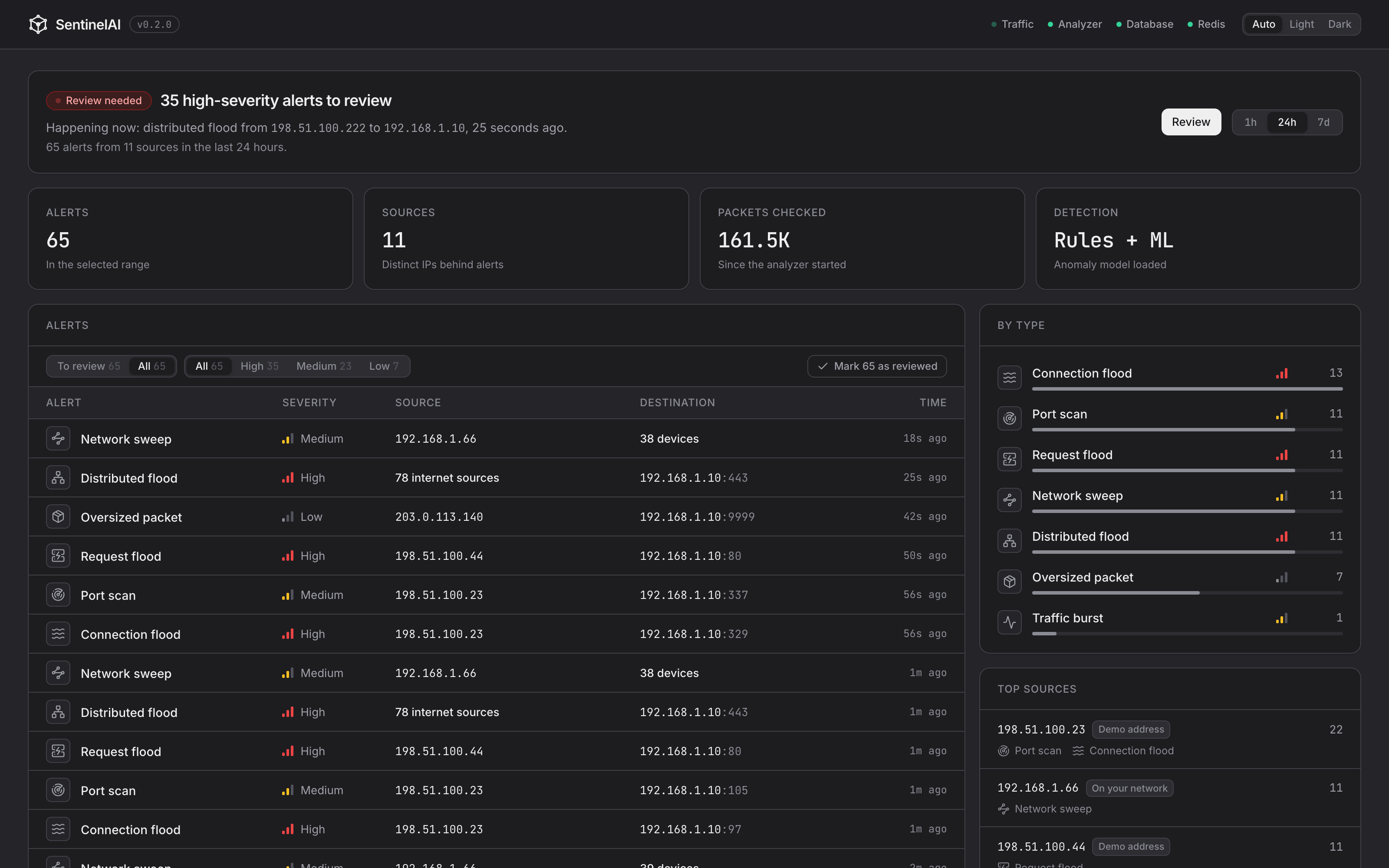
The SentinelAI dashboard: alerts to review, a table of recent alerts with severity, source and destination, and counts by type.

Real numbers, real traffic

Tested on public data. Misses included.

Five full days of CIC-IDS2017 replayed through the real detection pipeline. Each labelled flow counts as caught only if SentinelAI alerted on that connection while it was happening.

Thresholds tuned on this day

A port scan, an HTTP flood and a botnet, in 9.9 million packets.

AttackCaught
Port scan99.7%
DDoS (HTTP flood)99.9%
Botnet (Ares)23.9%
Normal flows wrongly flagged, check-in rule aside
0 of 380,557
Flagged by the check-in rule (one polling server)
1,441
Normal machines with a false alarm that day
1 of 7

CIC-IDS2017, Canadian Institute for Cybersecurity. Friday's thresholds were partly tuned on the same day. Wednesday and Monday were held out: every threshold was frozen before they were replayed. Tuesday and Thursday were kept untouched to test the 0.6.2 connection-flood fix, which failed its target there (details in the evaluation). All five days are shown with 0.6.2's rules.

  • Botnet flow recall looks low because every check-in before the first alert counts as missed. All five infected machines were flagged, each about 45 minutes after it started.
  • The check-in rule is noisy. It flagged a server that polls an internet service all day on every day tested, and on Monday also two workstations that kept reconnecting to dozens of web services for hours. Timing alone can't tell that apart from malware, and the rule hasn't been tuned to hide it. On a real laptop over 24 hours it flagged a code editor and the Claude apps 50 times, so it's off by default. These results were measured with it on.
  • An earlier version of these results had a scoring bug, found by the held-out Wednesday test. The numbers here are the corrected ones.
  • Thursday's infiltration scores 0% because the dataset labels only 36 of its flows as attacks. SentinelAI did flag it: the infected machine scanning the whole network raised port-scan and connection-flood alerts on every machine it scanned. Those count as false alarms above, because the dataset labels the scan as normal.
  • Tuesday's password guessing and Thursday's web attacks aren't caught by any rule: repeated logins look like normal connections, and web attacks live in page contents, which SentinelAI doesn't read.
  • In 0.6.4 the check-in rule also needs regular timing and alerts once a day per device: on Monday it raised 3 alerts instead of 34, on the same machines. In 48 hours on a real Mac it raised one. It's still off by default, because it flagged some unseen bots much later. These tabs still show 0.6.2's rules.
  • In 0.6.2, browsers opening many connections at once and quick bursts of lookups to an office server stopped raising false alarms, and floods that repeat after a pause stopped being missed. Every number on these tabs is measured with those rules. Normal machines are counted on each day leaving out every machine involved in a labelled attack.

Methodology, per-machine results and how to reproduce them

Features

Small enough to understand, useful enough to run.

A handful of readable rules, a dashboard that explains itself, and everything on your own hardware.

01 — Detection

Detection rules you can read

Nine rules, each a few lines of Python with thresholds in one config file.

  • Port scans and network sweeps
  • Connection floods, request floods and distributed floods
  • Traffic bursts and oversized packets
  • Connections to known botnet servers, from abuse.ch's ThreatFox list (optional: needs a free abuse.ch key)
  • Regular check-ins, the pattern botnets use to reach their controller (off by default: everyday apps do it too)

02 — Alerts

Alerts in plain language

Every alert says what happened, whether the source is on your network or the internet, the evidence behind it, and what to do next.

03 — Notifications

Alerts on your phone

High-severity alerts reach your phone in seconds, through your own ntfy server, email, Discord, Slack or Telegram. Each one names the devices involved and opens the alert in the dashboard.

  • Once per attack: an attack that goes on doesn't buzz your phone every minute
  • At most 10 an hour, with the rest in one summary, and optional quiet hours
  • Your own ntfy server keeps alerts on your machine, locked so only your phone can read them
  • A failed send is retried, and never holds up detection

04 — Names

Names, not just addresses

Give your devices names like Living room TV, and optionally let SentinelAI learn which sites they talk to, so an alert reads Office laptop → api.example.com instead of two IP addresses.

  • Device names you set, shown everywhere, including on older alerts
  • Optional hostnames from DNS, HTTP and TLS, kept in memory only (off by default)
  • Anything that isn't a valid hostname is dropped, never cleaned up into a different name

05 — Review

A review workflow

Mark alerts as reviewed one at a time or in bulk. The dashboard only asks for attention while something is unreviewed, then settles back to calm.

06 — Anomaly model

An optional anomaly model

An Isolation Forest trained on your own network's normal traffic flags what doesn't fit. It's off until you train it, and its alerts are never rated high.

07 — Resilience

Built to run unattended

Everything SentinelAI keeps has a hard limit, in memory and on disk, so it can run for months without filling up your machine. Ten million spoofed connections leave its memory flat at about 410 MB.

  • Old alerts deleted after 90 days, with at most 500,000 kept (about 750 MB), so the database can't fill your disk
  • Connections seen more than once are protected, so a flood has a much harder time pushing a slow scan out of memory before it's caught
  • A Memory limit reached alert if a flood ever gets that far
  • /health shows memory, the analyzer's backlog, lost packets and the database's size

08 — Privacy

Private by design

Everything runs on your hardware. By default it reads packet headers, not contents; optional hostname learning reads only DNS answers, HTTP Host headers and TLS server names. Every service listens on this machine only, unless you set a password and open the dashboard to your phone. Notifications go to your own ntfy server unless you choose email or a chat app. Nothing is downloaded unless you turn on the optional botnet-server list. No account, no cloud.

09 — Demo

See it work in two minutes

make demo replays seven kinds of simulated attack against a full local install, no root needed. The fake internet attackers use addresses reserved for documentation, so they can't be mistaken for real ones.

What it can't do

Know the blind spots before you rely on it.

It can't see Wi-Fi traffic between your own devices

Traffic between two devices on the same Wi-Fi access point never crosses a wire SentinelAI can watch. Traffic to and from the internet is still seen, but a laptop scanning your smart TV over Wi-Fi isn't.

It may not keep up with a busy gigabit network

Packet capture runs in Python. Its speed on a Raspberry Pi hasn't been measured yet, and on a saturated link it may miss packets.

It misses slow attacks, very short floods, password guessing and anything inside the payload

Slowloris sends almost no traffic, by design, and was missed completely. Password guessing over FTP and SSH looks like ordinary logins. Heartbleed and web attacks such as SQL injection live inside the traffic's contents, which SentinelAI doesn't read. All were 0% in testing. And a flood that stops within a second isn't reported, so that normal bursts of connections don't raise alarms.

It detects, it doesn't block

SentinelAI tells you what's happening. It never drops traffic, so a false alarm can't take your internet down.

What's next

Planned, not built yet.

None of this exists today. Each has a written plan, with what it must do before it ships.

Planned

Raspberry Pi installer

A Raspberry Pi 4 or 5 on a mirror port of your switch, watching every device and starting on boot.

Planned

Local AI triage

A model on your own network adds a verdict and a reason to each alert. Advice only: it can never hide or downgrade one.

Read the roadmap

FAQ

Questions people ask.

How is this different from Pi-hole?

Pi-hole blocks ads and trackers by refusing DNS lookups for known domains. SentinelAI doesn't block anything: it watches traffic for attack patterns such as scans, floods and sweeps. They do different jobs and run happily side by side.

Why not Suricata or Zeek?

Suricata matches traffic against thousands of known attack signatures and reads packet contents. Zeek turns traffic into detailed logs for analysts. Both are mature and more thorough. SentinelAI is smaller: a few readable rules, a dashboard that explains each alert, and results published with their misses. If you need an enterprise IDS, use Suricata.

What hardware do I need?

A Mac or Linux machine with Docker. A Raspberry Pi 4 or 5 is planned as the recommended setup, but its installer isn't built yet, so it isn't supported today.

How do I see my whole network, not just one computer?

On its own, SentinelAI sees the traffic of the machine it runs on. To see every device, give it a copy of the traffic: a managed switch with port mirroring (about R350–R1,000) is the simplest and safest; a Raspberry Pi set up as a bridge between your router and your network sees everything but becomes a single point of failure; some routers can capture traffic themselves.

Can I check it from my phone?

Yes. Set a password, set DASHBOARD_BIND=0.0.0.0, and open the dashboard at your computer's address. Away from home, use Tailscale, a free private network between your own devices, rather than opening a port on your router. The README has the steps.

Is it ready to rely on?

Not yet. It's an early release, a learning and home-lab tool rather than a replacement for a professional security product. The numbers on this page are honest, including where it fails.

Is it legal to use?

Only monitor networks you own or have explicit permission to monitor. Capturing other people's traffic without consent is illegal in many countries.

Get started

Run it on your own network.

From source

On a Mac or Linux machine with Docker and make. The demo simulates attacks, so you can see detection working in two minutes.

$ git clone https://github.com/smngvlkz/sentinel.git$ cd sentinel$ make demo   # then open http://localhost:3001

To watch your real network instead, run make setup, set CAPTURE_INTERFACE in .env, then make up and make capture.

Raspberry Pi

Planned

A Raspberry Pi 4 or 5 on a mirror port of your switch, watching every device and starting on boot.

Install steps will appear here once the Raspberry Pi installer is built. See what's next.

Only monitor networks you own or have explicit permission to monitor.